
A tour of the Posta workspace
The workspace is where you work with Posta after you sign in. The sidebar on the left takes you to each part of the app.
What is on the Home page?
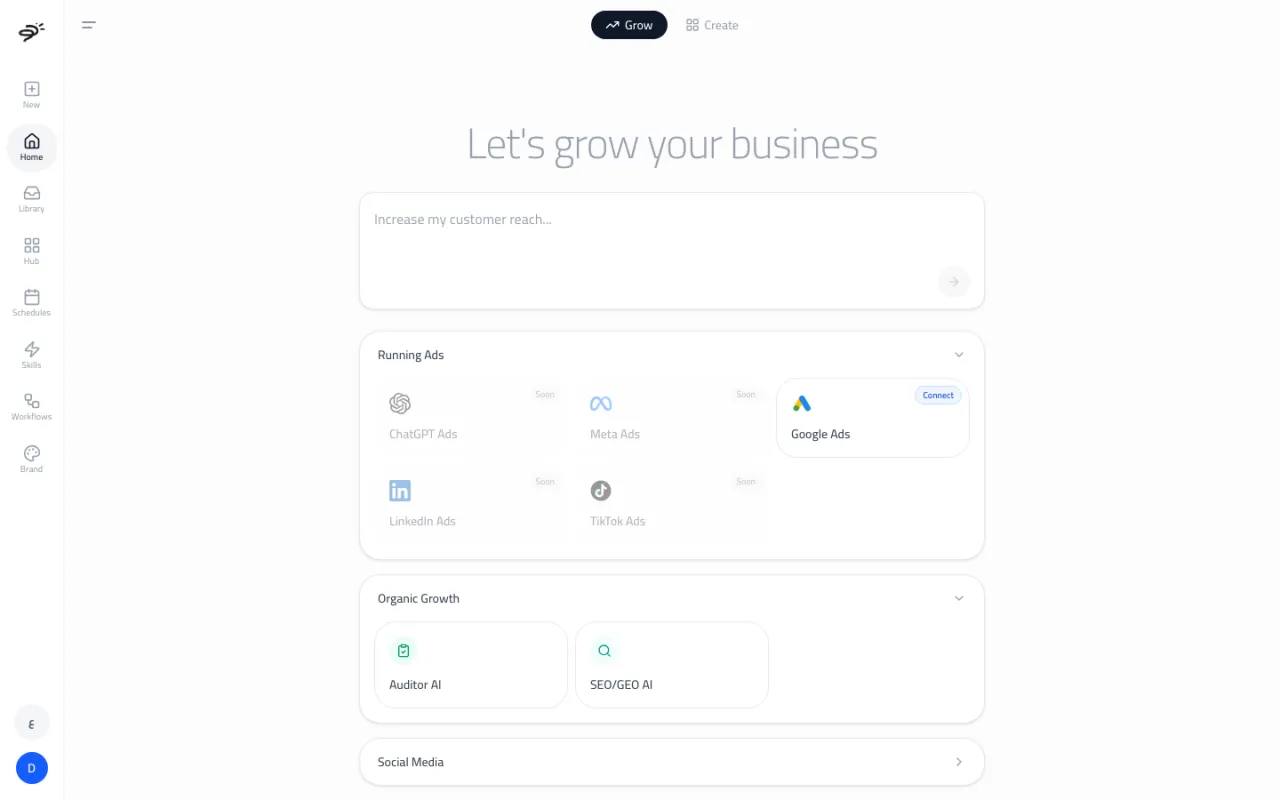
Home has two tabs at the top. Each tab is one of Posta's two main agents.
- Grow is for paid ads and growth. Type a goal in the box to talk to the Media Buyer. Below the box you find Running Ads (your ad platforms), Organic Growth (Auditor AI and SEO/GEO AI), and Social Media (coming soon).
- Create is for everything else. Type any request in the box to talk to the orchestrator chat. Below the box you find cards for each content agent: Video AI, UGC Ad AI, Image AI, Ads Creator AI, and AI Team.
What is in the sidebar?
| Item | What it does |
|---|---|
| New | Starts a new chat. |
| Home | The Grow and Create tabs. |
| Library | Every image and video you made or uploaded. See Library and sharing. |
| Hub | Connect your ad accounts, store, and 1,500+ other apps. See Integrations. |
| Schedules | Tasks that run on their own, for example every Monday at 9am. See Workflows and schedules. |
| Skills | Add expert knowledge to your agents. See Skills. |
| Workflows | Ready-made automations you can run in one click. See Workflows and schedules. |
| Brand | Your brand profile: colors, fonts, and tone of voice. See Brand profile. |
At the bottom of the sidebar are the language button (English or Arabic) and your account button, which opens Settings.
How do I find an old chat?
Every agent keeps its own chat history. Open Chat history from the button at the top of any chat to see your past conversations. Use Search Chats to find one by its words. Select a chat to open it where you left off, with all its images, reports, and steps.
What is in Settings?
Open Settings from your account button. It has three sections:
- General: your name and email.
- Billing & Plans: your plan, your credits, top-ups, and billing. See Plans and credits.
- Chat apps: use Posta from Slack. See Chat apps.
What is the Upgrade button?
If you are on free credits, an Upgrade button shows at the top right of the workspace. It opens the plan picker. A paid plan unlocks the content creation agents (Image AI, Video AI, UGC Ad AI, and Ads Creator AI).
Does the workspace show me around?
Yes. The first time you open some pages, like Home, Library, and Schedules, a short tour explains what they do. You can skip it at any time.
Last updated September 25, 2026