
Sub-agent
Ads Creator AI
Ads Creator AI makes a complete set of ads from one product page. Paste the link, pick where the ads will run and in which sizes, and it creates the images and the ad copy for each one.
You can open Ads Creator AI from its card on the Create tab, or ask in the Create chat ("Make Meta ads for https://yourstore.com/products/serum"). The chat opens Ads Creator AI and fills in what you already told it.
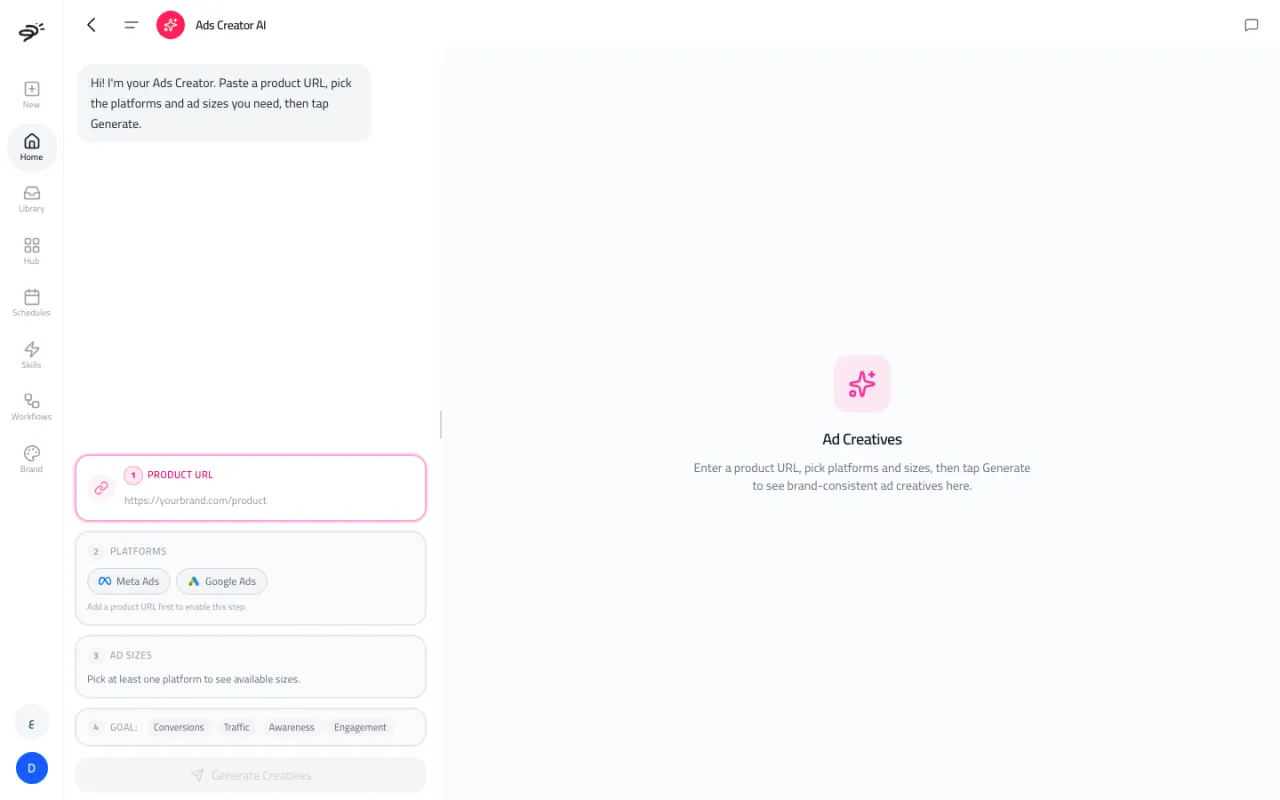
How do I make ads?
- Product URL. Paste the link to the product page you want to advertise.
- Platforms. Pick Meta Ads, Google Ads, or both.
- Ad sizes. Pick the sizes you need (see below).
- Goal (optional). Conversions, Traffic, Awareness, or Engagement.
Select Generate Creatives. Posta then works through five stages, and you can watch each one:
- Analyzing the brand and the product on the page
- Generating ad ideas
- Writing ad copy
- Generating ad creatives (the images)
- Reviewing creatives, to catch problems before you see them
The finished ads show on the right. Each one has its image and its copy, ready to review and download.
Which ad sizes are available?
| Platform | Sizes |
|---|---|
| Meta Ads | 1080×1080 (square), 1080×1350 (portrait), 1080×1920 (story and reel), 1200×628 (link) |
| Google Ads | 1200×628 (display banner), 300×250, 336×280, 728×90 (leaderboard), 320×100 (mobile banner), 300×600 (half page) |
Does it use my brand profile?
Ads Creator reads the product page you give it, and builds the look of the ads from that page. This way the ads always show the real product you are selling.
How many credits does it use?
Each ad image uses image credits, so the total depends on how many platforms and sizes you pick. Picking fewer sizes uses fewer credits.
Last updated September 25, 2026