
Your brand profile
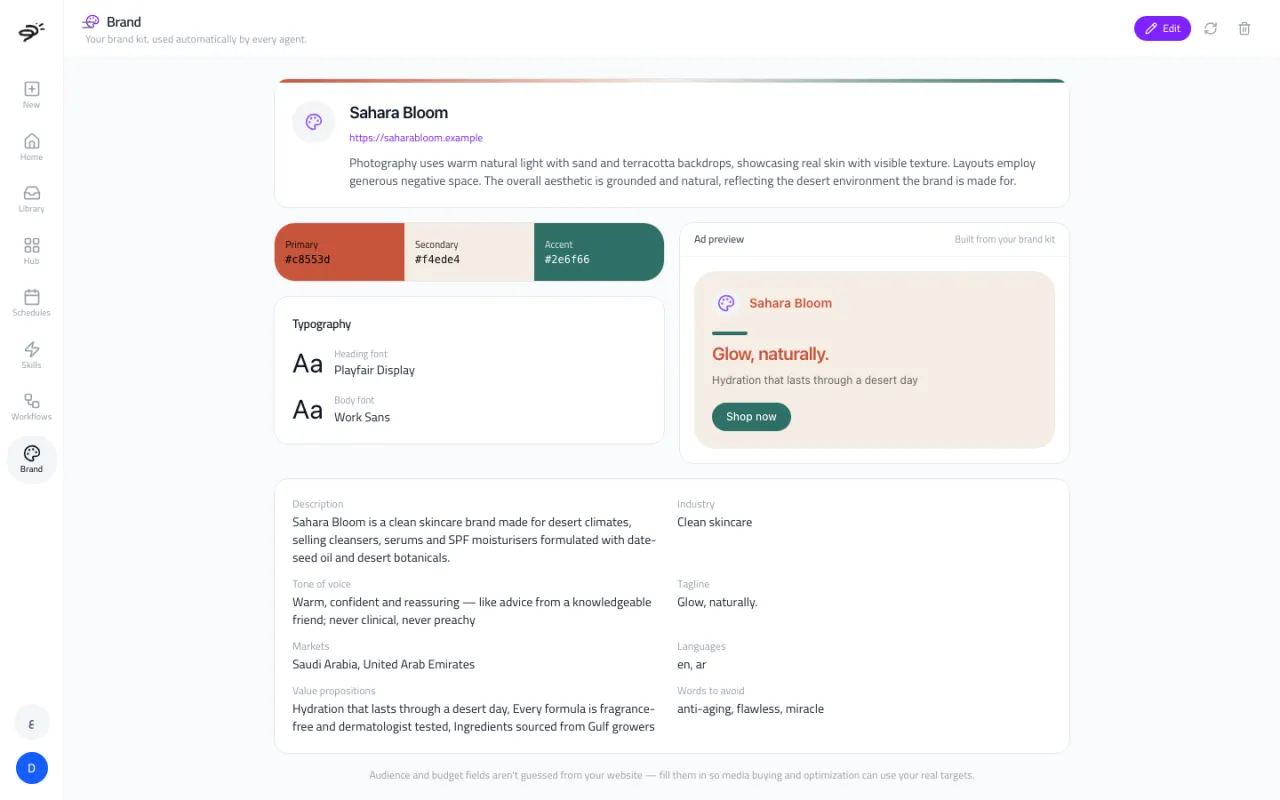
Your brand profile tells Posta who you are: your colors, fonts, tone of voice, and key facts about your business. Every agent reads it on its own, so you never have to explain your brand twice. Images and videos match your style, and written content sounds like you.
Open it from Brand in the sidebar.
How do I create one?
Choose where Posta should learn about your brand:
- Website. Type your website address. Posta reads your homepage, including its colors, fonts, images, and text.
- Guidelines document. Upload your brand guidelines as a PDF, Word (DOCX), or Markdown file, up to 10 MB. Posta reads the colors, fonts, tone of voice, and rules written in it.
Posta shows you a draft with a sample ad. Nothing is saved until you check it and select Save. You can also do this during setup.
What is in a brand profile?
- Name, website, and a short description of your brand and its look.
- Colors: primary, secondary, and accent.
- Fonts: a heading font and a body font.
- Industry, tagline, markets, and languages.
- Tone of voice: how your brand talks.
- Value propositions: why people buy from you.
- Words to avoid and compliance notes, like claims you are not allowed to make. These come from your guidelines document.
Why are some fields empty?
Posta does not guess your audience or your budget targets, like your target cost per purchase. A website does not say these, and a wrong guess could waste ad money. Fill them in yourself with Edit, so the Media Buyer can use your real targets.
How do I change it?
- Edit any field by hand.
- Re-analyze your website to refresh the profile. Fields you typed yourself are kept.
- Delete the profile to start again.
Which agents use it?
The Create chat, the Media Buyer, Image AI, Video AI, UGC Ad AI, and AI Team all use your brand profile. Ads Creator AI is the one exception: it reads the product page you give it, so the ads always show the real product.
Last updated September 25, 2026